


Narrow your search
Modification Details
Translate Evilution
german french spanish italian greek finish danish polish japanese russian
Search Evilution
Most Viewed Pages
Most Rated Pages
Glove Box Insert Removal
Remove the glove box insert to remove the upper dash or to properly fit the glove box flap
 Glove Box Insert Removal

Below you can see the glove box insert, it looks well enclosed but removal isn't that hard.

Remove the stereo, Remove the dash sides, Remove the lower dash.
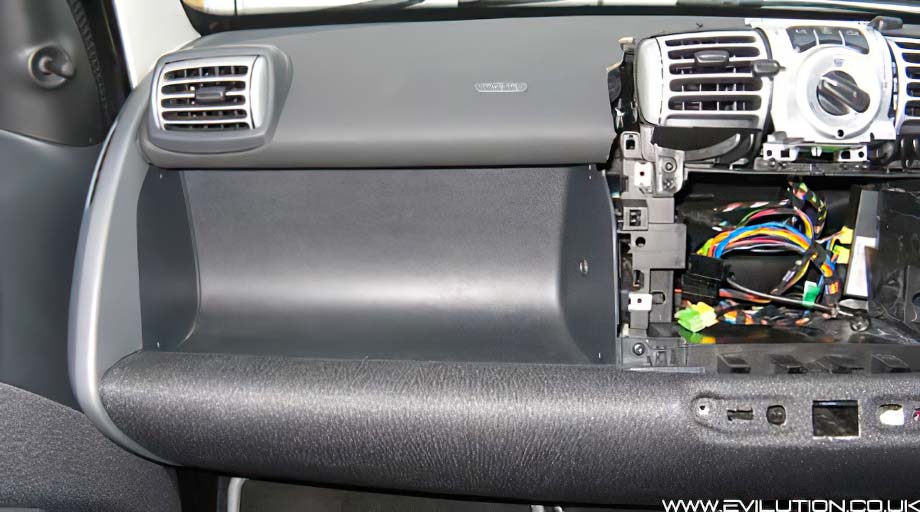


Remove the polystyrene block by gently pulling the top towards you and pushing it down.


Remove the Torx25 screw from the side (circled below).


Remove the Torx screw from the lower bracket.


2 final Torx screws  are found on the other side of the glove box, remove these too.


Look up underneath the glove box insert, you will see 2 plastic pins, pull these out with their inserts.


As you can see, as you push the pin into the insert it splays open holding everything in place.


The glove box insert can now be pulled away from the dashboard area.
If you have the MP3 input fitted already, be careful not to snag the wire as you pull.


Now you have the insert out, you can properly fit the glove box flap.


Click if Info Helpful

Buy me a drink

Contact us about mod

Print page

Translate

Back to top