


Mod Description
So many buttons, what do they all do?Mod Details
PremiumNo Difficulty
 Mod ID311
CreditEvilution/Smart
For
Mod ID311
CreditEvilution/Smart
For
 Linkhttps://www.evilution.co.uk/mod/grundig-face-info.htm Copy to Clipboard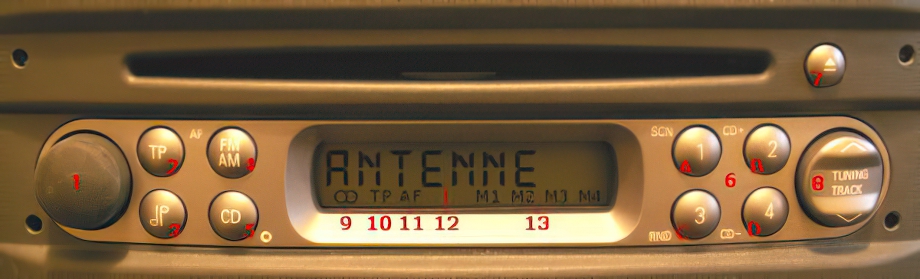
Stereo Face Info
Key
sp = Short press
lp = Long press
1 – sp = on/off
twist = volume up/down
2 – sp = TP on/off
lp = AF on/off
3 – sp = bass, treble, balance, loudness
4 – sp = switch from AM to FM
5 – sp = CD mode, CD change mode
lp = select/end expert settings
6 – Radio mode:
sp = select station
lp = store station
CD mode:
A = scan on/off
B = select CD up
C = random on/off
D = select CD down
7 – sp = eject CD
8 – Radio mode:
sp = RDS scan
lp = manual station search
Expert mode:
sp = change settings
CD changer mode:
sp = scan
9 – stereo audio
10 – station button
11 – alternative frequencies
12 – variable display
13 – station button number