

Narrow your search
Modification Details
Translate Evilution
german french spanish italian greek finish danish polish japanese russian
Search Evilution
Most Viewed Pages
Most Rated Pages
Becker Sat Nav
Every you need to know about fitting a Becker sat nav to your 450 or Roadster
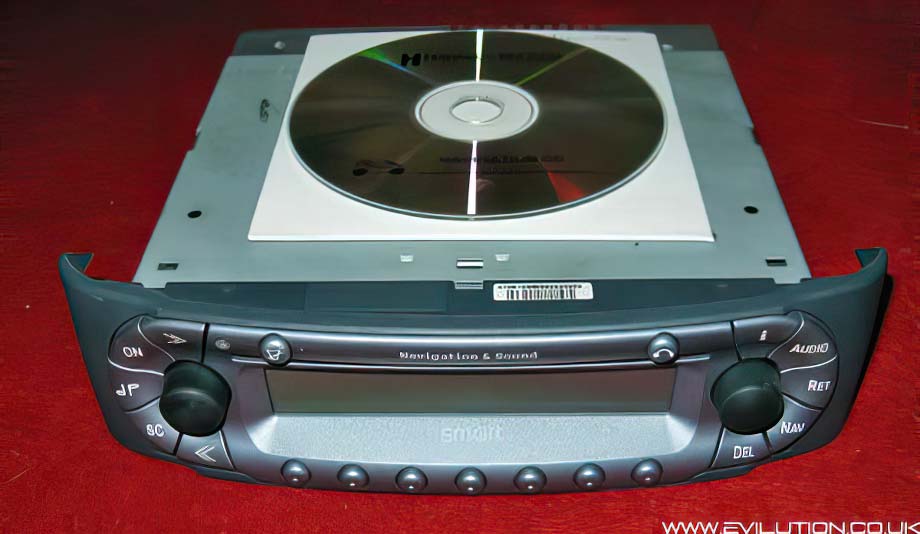
Smart Navigation & Sound

Throughout the life of the Fortwo and Roadster, a very expensive Becker satellite navigation was offered. The price made it quite a rare piece of kit so not a great deal of info was known about it.

This is the £1000 Becker BE 6040 Navigation & Sound


It was a refaced version of the APS30 unit used in Mercedes cars around the same time.
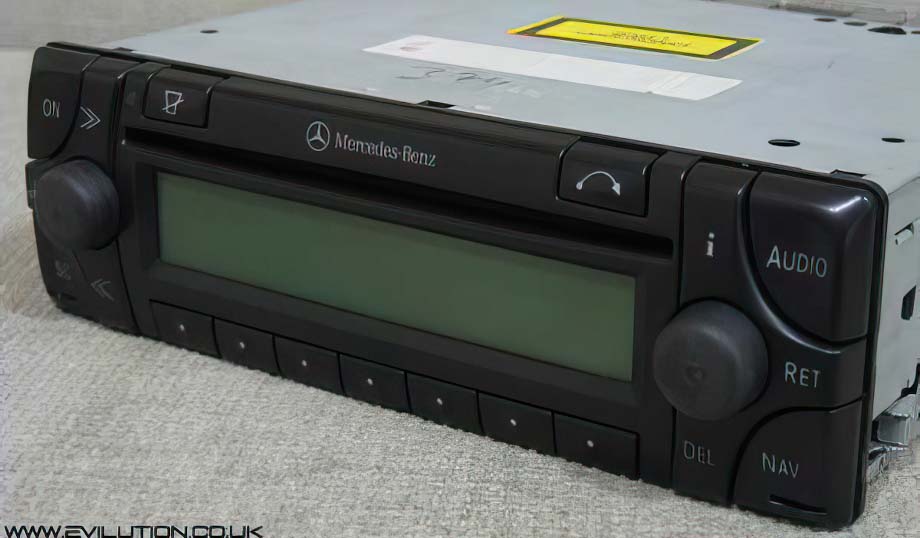


All of the connections on the rear are the same, there are a few extras compared to normal stereos.
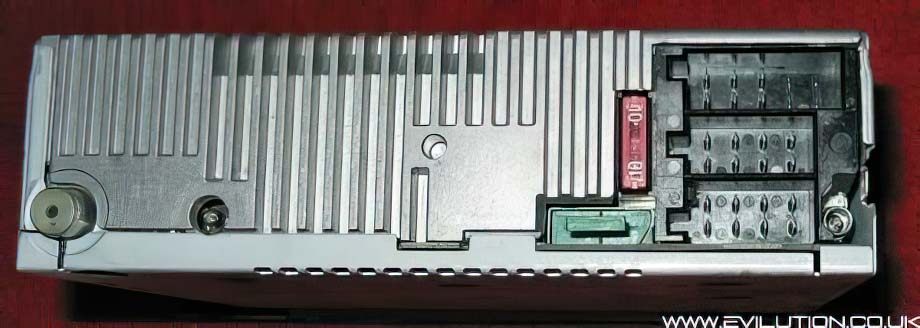


Starting on the left, you have the radio aerial input which is the same as all the other smart stereos.
To the left of that is the TMC antenna input that isn't used in this version.
To the left of that (behind the green plug) is an optical input for Becker CD changers.
On the far right you have the standard ISO inputs which are detailed below.
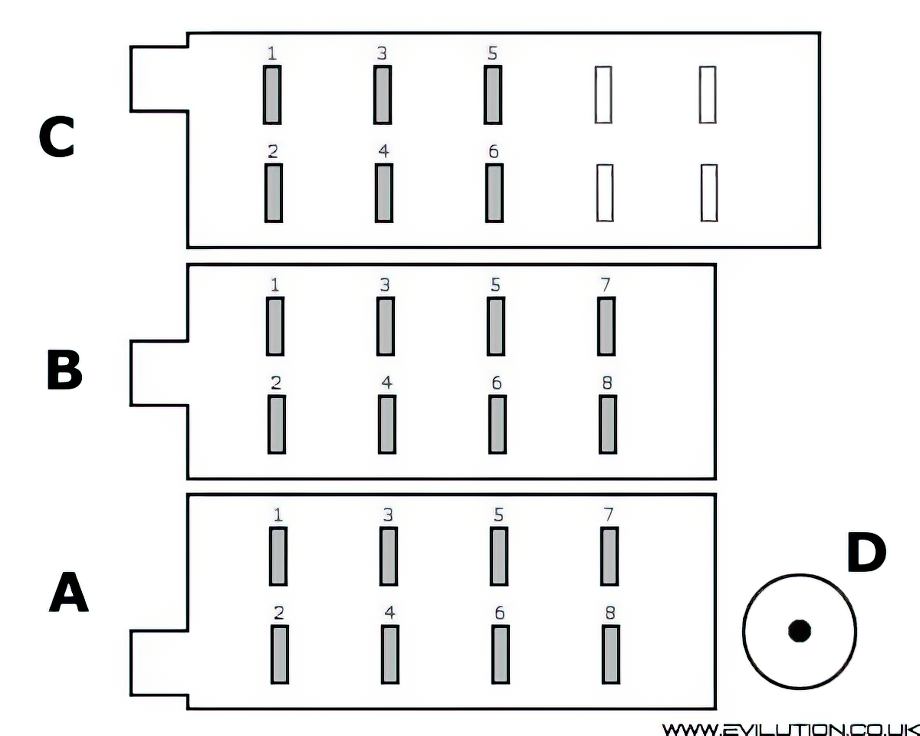
 
Pin Number Connection
A1 GALA Speed Impulse
A2 K-line
A3 Mute
A4 12v Permanent
A5 12v Remote Out
A6 Lighting Input
A7 12v Switched
A8 Earth
B1 Tweeter Right +
B2 Tweeter Right -
B3 Speaker Right +
B4 Speaker Right -
B5 Speaker Left +
B6 Speaker Left -
B7 Tweeter Left +
B8 Tweeter Left -
C1 CAN High
C2 CAN Low
C3 Reverse Signal
C4 Wake Up
C5 12v Permanent Output
C6 Earth
D1 GPS Antenna
 
Fitting The Navigation & Sound Unit

There are 2 versions, 1 for the Fortwo and 1 for the Roadster, only difference is the size of the facia.
Worth noting though as the Fortwo version will not fit a Roadster and vice versa.

Remove your standard stereo to make room for the new addition.
You will need to swap the switch and permanent live over, this is easier if
you have an ISO extension lead as you can create the correct wiring and
add the speed pulse wire in the comfort of your house.


The only other thing you will need is a GPS aerial with a Wiclic connector, check Ebay.
I picked one up on Ebay for about £12 and it had plenty of cable.
You can put the antenna in a lot of places, they usually have a magnetic base so they can sit nicely
in the interior of the tridion just below the windscreen. Alternatively they work just fine even
underneath the plastic body panels. The Fortwo antenna is fitted underneath the front centre panel
from the factory, The Roadster antenna is usually fitted underneath the front left hand wing as you
sit in the car. Route the wire to the back of the stereo and plug it into connection D (shown above).

The Navigation & Sound unit does not use an external GPS board, it is all built into the stereo.

Add a wire to pin A1 (GALA speed pulse) as listed above. This connects to the speedo
seen here.
Plug all of the connections in, slide the new stereo in place and you are done fitting it.

Setting Up

The Navigation & Sound is a CD based unit that is very configurable.
On the first start up you will be asked for a 5 digit security code, if you don't know it, don't guess.
There are websites that can tell you the code for a small payment. Worked for my one.
Once you have inputted the security code it won't ask again unless you disconnect it.


As soon as you correctly input the code, the radio springs to life and I was impressed at how much better the sound was over the standard Grundig stereo. Reception and clarity were very good.

The first thing you will want to do is to set the system up.
This covers language, time, date and tyre sizes amongst other things.


With that done you can test the antenna works by seeing how many satellites you are receiving.


As long as you can receive at least 3 satellites you can start the navigation.
Insert the navigation CD and input the destination required (place and road and house number),
wait for the route to be calculated and you can remove the navigation disc.
You can put a standard audio CD in now and listen to your music as normal.


The display shows helpful arrows and icon denoting upcoming turns and maneuvers, plus you get
everything announced through the car speakers unless you press and hold the mute button.
The screen does not display a map which is probably a good thing due to low resolution.

Updates And Extras

The updated navigation CDs are easy to get hold of off of Ebay, they have no copy protection
so exact copies of navigation discs meant for the Mercedes APS30 seem to work fine.
These CDs contain new maps and new software. The one shown above was running 2003 V6
maps and software so more features could be available on the new 2008 V10 disc.

Currently you can buy the 5 CD set covering all of Europe for about £30. See here.

This unit contains many of the standard things you see in sat navs sold today.
Dynamic route guidance, custom & local area POIs, traffic announcements, destination memory etc.


Click if Info Helpful

Buy me a drink

Contact us about mod

Print page

Translate

Back to top